




















 Dec 17, 2025
As we step into 2026, project managers need more than traditional tools. They need smarter tools that help them plan, minimize risks, and timely deliveries.
So… what does the right strategy look like?
Let’s break it down.

The Key to Successful Projects: AI-Powered Project Management
AI-Powered Project Management platforms are helping managers with:
- Smarter Task Planning: AI predicts delay and finds better task scheduling ways.
- Employe’s Hour Tracking: Team’s hours and productivity are automatically monitored.
- Project Cost Control: Alerts managers if budget is tightening, and tracks expenses.
- Better Organization: Project tasks and deadlines can be viewed via dashboard.
- Project Collaboration: Team can share files and communicate with manager from one place.
- Saving Time: AI sends deadline reminders and task updates to the team.
- Focus on strategy and projects.
- Deliver top-notch projects on time.
- Keep track of the team.
- Not getting overburdened by work.
Here arises the biggest issue:
Not all AI-Powered Project Management platforms are for you.
Some platforms may lack important features, whereas others have complex interfaces that not every team member can understand.
This is why I have tested out the best AI-Powered Project Management Platforms for you:
| Platform | Main Features | Pricing (per user/month) |
| ManageMinds | Project cost tracking, hours tracking, AI reporting, and smart reminders. | Free |
| Trello | Drag-and-drop, due dates, checklists; simple workflow views; integrations & Power-Ups for added views and automation. | Free; Standard $5; Premium $10. |
| Celoxis | Advanced planning, budgeting, resource management, and dashboards. | Essential $15; Professional $25; Ultimate $35. |
| Smartsheet | Spreadsheet-style project management with grid/calendar views, dashboards, automation rules, and alerts. | Free tier available; paid plans from $7–$32. |
While all these platforms are excellent, you can only choose one, right?
Choose a platform which is:
- User-friendly.
- Interactive.
- Manages all your work in one place.
- Fulfills all project objectives.
- Addresses your pain points.
ManageMinds: Where Clarity Meets Simplicity
Among the above platforms, ManageMinds, built by Aciano Technologies, it has truly lived up to its mark.ManageMinds Features
Online Project Management Dashboard
A Web Dashboard that allows project leads and team members to check all ongoing tasks, see what’s next on the list, resource allocation, task progress, how people are assigned, and an entire project portfolio, including active projects and upcoming milestones—everything in one place.
Task planning with AI-supported Scheduling
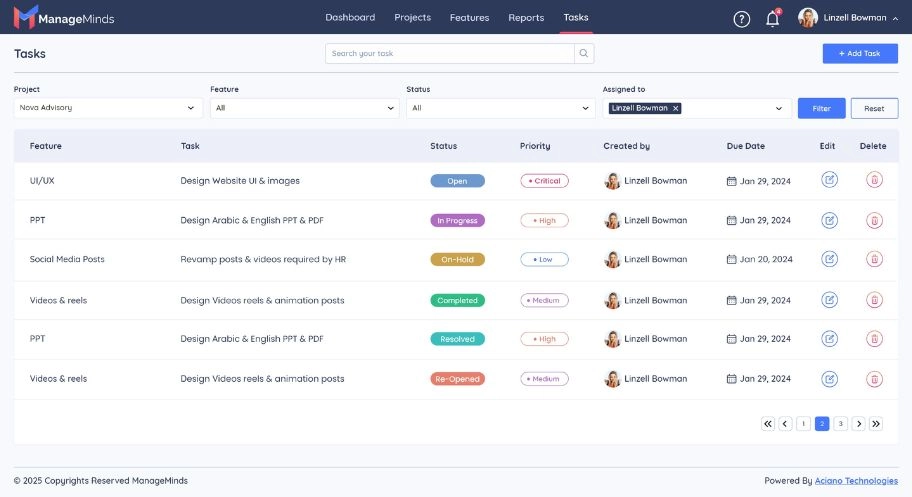
Let project leaders add tasks, assign them to the right employees, pin down due dates—and AI reminds team members of incomplete tasks, approaching deadlines and missing hours logged.
Hours Tracking and Project Hours Tracker

Allows team members to log time spent on tasks, while the system groups it per project, person. Moreover, it shows straightforward reports with hours used, hours left, and how estimates compare to real-time use.
Assign Tasks and Roles with Resource Management
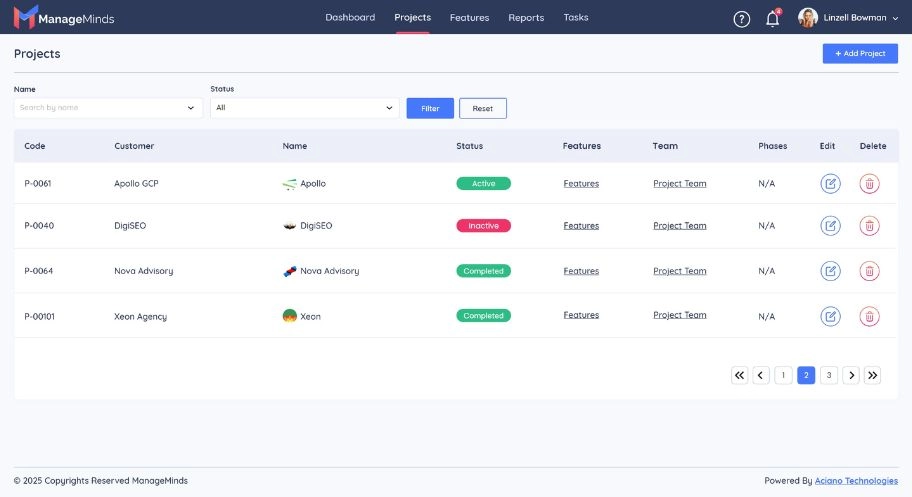
It allows a team member to be assigned a particular task, manage workload, and keep an eye on how much they’ve got on their plate. Tasks can also be reassigned, while also letting managers view which person is responsible for which task.
Collaboration and Communication Module
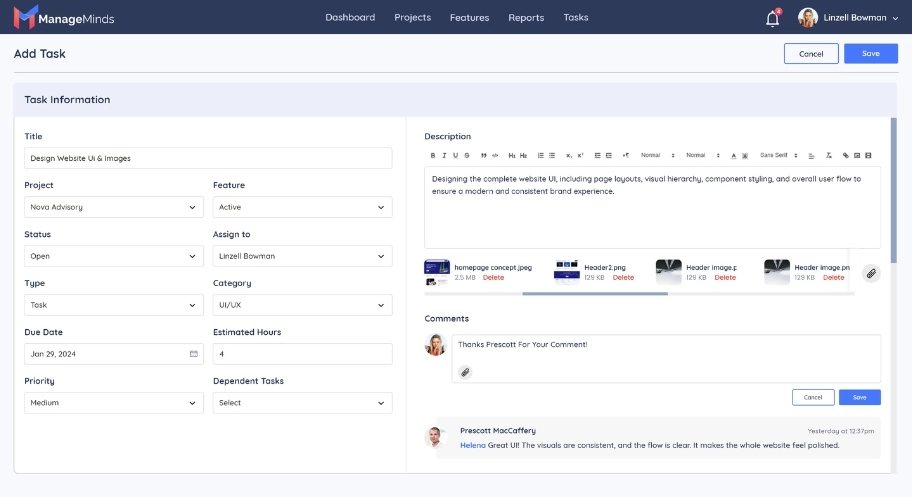
Allow in-tool comments, status updates, file sharing, notifications—so that team members, even across remote locations, stay aligned.
Task Planning with Higher Precision
With the task graph model and resource metadata, ManageMinds supports advanced task planning:
- Automatic Detection of Dependency Conflicts: Finds out where tasks are clashed or wrongly scheduled.
- Priority-Based Scheduling: Tasks are ranked based on their importance.
- Timeline Prediction: The tool estimates the finishing time of a project.
ManageMinds supports:
- Real live Dashboards for hours consumed, remaining budget, and resource utilization.
- Alerts when a project or task exceeds planned hours or cost of thresholds.
- Historical reporting: how much time projects took, which resources consumed most hours, and overall summaries.
Why Skipping Project Management Platforms Can Be Dangerous
Here is what will happen if managers don't use Project Management Platform:Managers risk missed deadlines, budget overruns, and lost visibility into tasks and team performance—problems that AI-powered tools are designed to prevent.
Plus, managers would have to go an extra mile to keep an eye on employees, send them reminders, and keep up with their assigned tasks.
All of this can distract them from their own work, create chaos, and result in poor project deliveries.
Sounds exhausting, right?
This is why 80% of businesses are using Project Management Platform, with advanced AI agents, to avoid failures and distractions.
Managing projects doesn’t have to be chaotic or stressful. With the right AI-powered platform like ManageMinds, managers can plan smarter, stay organized, and deliver top-notch results—without drowning in spreadsheets, reminders, or missed deadlines. For any queries, contact us.
Frequently Asked Questions
How to use AI tools in Project Management?
You can use AI tools to handle task scheduling automatically, spot possible project delays, check how busy people are, or balance resources better. At the same time, it gives early warnings about risks, pulls useful info out of past projects, so teams deal with linked tasks easier. Many current AI systems for managing projects connect straight into teamwork apps, which makes getting things done faster while cutting mistakes.
What are the 4 types of AI?
The four main kinds of AI people talk about are Reactive Machines, Limited Memory AI, Theory of Mind AI, along with Self-Aware AI. Right now, in real-world use, many business and project tools go with Limited Memory AI—this type uses old data to guess what might happen next or suggest actions.
Which is the best free Project Management Tool?
The top free tool really depends on how complex your project is. Yet the best platforms powered by AI include ManageMinds, Clickup, Trello, and Jira.
What are the 5 C's of Project Management?
The 5 C’s are Clarity, Commitment, Communication, Consistency, or Courage - each one keeps teams on track. With them, groups avoid confusion, stick to goals, talk openly, follow through, yet face tough moments head-on.
How is AI used in Management?
AI helps managers check how people are doing, guess what might happen next, sort out team schedules, and handle routine paperwork. Since it shows updates right away, choices get easier; things run smoother at work while bosses spot problems sooner. On projects, this tech keeps teams more in sync, cuts mistakes, plus pushes plans forward smarter.

