




















When pages take too long to load, visitors may leave a product page before seeing the offer, abandon a service page before submitting an inquiry, or move to a competitor's website. The impact can extend beyond user experience. Website performance can also affect search experience, engagement, conversion opportunities, and ultimately the value a business gets from its online presence.
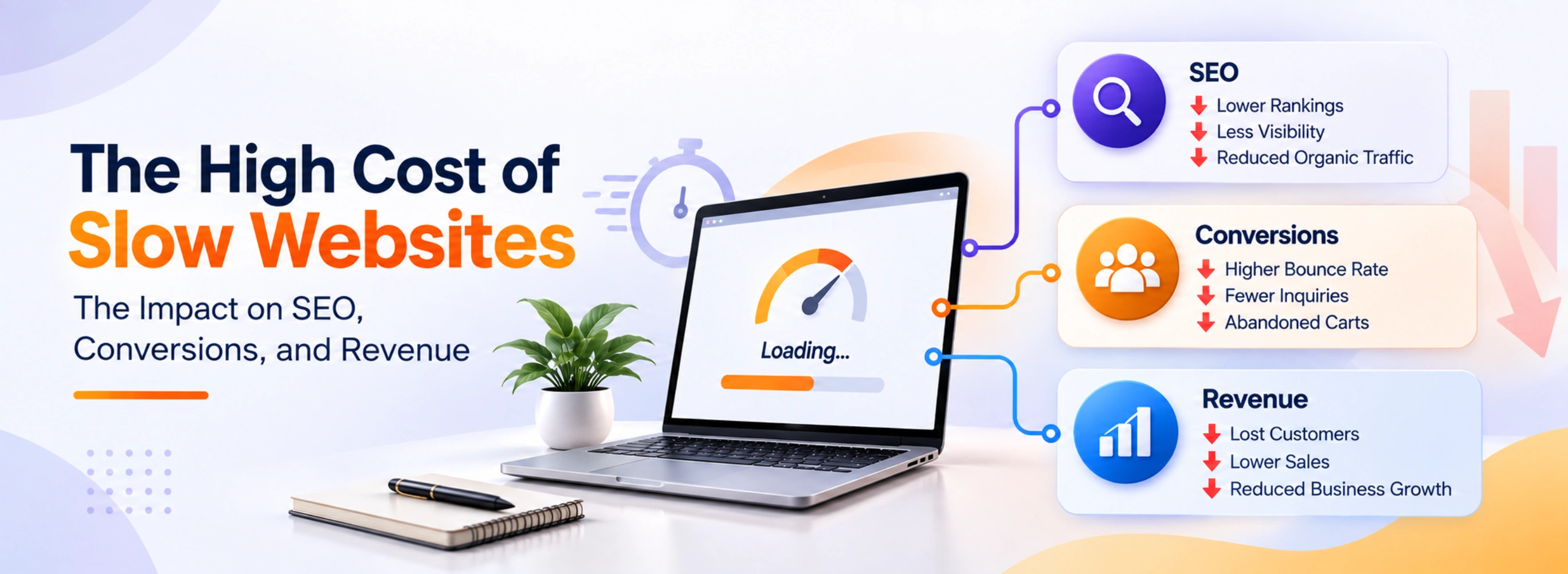
For Pakistani businesses, startups, SMEs, and e-commerce companies, website page speed should therefore be considered during website development and not treated as a technical issue to address later. This article looks at why speed matters, what causes slow websites, and how businesses can improve website performance through practical website optimization.
Key Takeaways
- Slow websites can hurt user experience, SEO, and conversions.
- Poor page speed can lead to higher bounce rates and lost opportunities.
- Large images, heavy scripts, and slow hosting are common causes of slow websites.
- Website optimization can improve loading speed and overall performance.
- Speed should be considered from the start of website development, not treated as an afterthought.
Why Website Page Speed Matters for Businesses
How a few extra seconds can affect the user experience
Website page speed refers to how quickly a web page loads and becomes usable for a visitor. It includes more than the first visual elements appearing on screen. A visitor also needs to be able to scroll, click buttons, use forms, view images, and interact with the page without unnecessary delays.Speed creates an early impression of a business. A visitor who reaches a website and immediately sees the content can start exploring. Someone who encounters a blank screen, slowly loading images, or an unresponsive page has a very different experience.
This becomes particularly important on mobile devices. Many customers access business websites through smartphones while using mobile networks or devices with limited resources. A page that performs acceptably on a powerful desktop can still feel slow on a mobile device.
A slow website can create several practical problems:
- A potential customer may abandon a product page before reviewing its details.
- Someone looking for a service may leave before finding the contact form.
- A visitor comparing suppliers may return to search results and choose another website.
- A mobile user may stop browsing if important content takes too long to become available.
- Existing customers may become frustrated when frequently used pages respond slowly.
How Slow Websites Hurt SEO and Search Visibility
The relationship between website performance and search experience
Website performance and SEO are closely connected, but speed should not be viewed as a standalone ranking solution. Search engines consider many signals when evaluating and presenting pages, including relevance, content quality, technical accessibility, mobile experience, and other aspects of page experience.Core Web Vitals are one part of Google's broader approach to measuring aspects of real-world user experience. They focus on areas such as loading performance, responsiveness, and visual stability. Poor performance can therefore become part of a wider technical and user-experience problem.
For businesses investing in website development Pakistan projects, this is an important consideration. A website should not only be designed to look attractive. Its technical structure should also support accessibility, usability, crawlability, and efficient delivery of content.
Slow performance can affect SEO in several ways:
- Visitors may interact less with pages that take too long to become usable.
- Mobile users may experience a poorer search-to-website journey.
- Large or inefficient pages can require more resources to load and process.
- Technical performance problems can exist alongside other SEO issues.
- Poor user experience can make it harder for visitors to engage with important content.
The practical approach is to treat technical SEO and website performance as connected parts of a broader optimization strategy. A fast website should also be useful, accessible, relevant, technically sound, and easy for search engines and visitors to understand.
The Revenue Impact of Slow Website Performance
How speed problems can turn traffic into lost opportunities
Website traffic only creates business value when visitors can actually engage with the website. If performance problems create friction at important stages, some of that traffic may never turn into a lead, inquiry, purchase, or returning customer.Consider an e-commerce business. A visitor may successfully reach the store but encounter slow-loading product images. If the product page takes too long to become usable, the customer may stop browsing. Similarly, a slow checkout process can create unnecessary friction at the point where a purchase is almost complete.
For service businesses, the same issue can occur earlier in the journey. A prospective customer might search for a service, open the website, and leave before reading the service details because the page is taking too long to load.
The business impact depends on the website, audience, traffic sources, technical setup, and type of conversion. There is no universal percentage that can accurately describe the revenue lost by every slow website.
| Website Problem | Possible User Response | Potential Business Impact |
|---|---|---|
| Slow homepage | Visitor leaves early | Lost engagement |
| Slow product page | Visitor abandons browsing | Fewer purchase opportunities |
| Slow contact page | User gives up | Fewer leads |
| Slow checkout | Customer abandons process | Lost sales |
| Poor mobile performance | User switches to another site | Reduced conversion opportunities |
Speed can also influence trust. A website that repeatedly freezes, displays content late, or responds slowly may feel less reliable to a potential customer. That does not mean visitors automatically reject slow websites, but unnecessary technical friction can make an already competitive buying decision harder.
Businesses should therefore look beyond traffic numbers. A useful question is: Can visitors move through the website easily from landing page to desired action?
Performance should be reviewed across important journeys such as:
- Homepage → service/product page
- Search result → landing page
- Product page → cart
- Landing page → contact form
- Mobile visit → inquiry or purchase
What Causes a website to Load Slowly?
Common technical problems behind poor website performance
A slow website rarely has just one possible cause. Performance can be affected by everything from image sizes to server response times and third-party scripts.Large images are one of the most common problems. A high-resolution image may look excellent but contain far more data than the visitor actually needs. Serving appropriately sized and compressed images can reduce the amount of information a browser needs to download.
JavaScript and CSS can also become excessive. Websites often accumulate tracking scripts, plugins, animations, widgets, chat tools, analytics integrations, and other resources. Each may serve a purpose, but too many can increase the work required to render a page.
Hosting and server performance matter as well. If the server takes too long to respond, optimizing front-end assets alone may not solve the problem.
Other common causes include:
- Large page sizes
- Unoptimized databases
- Too many plugins or extensions
- Poorly implemented tracking tools
- Unoptimized fonts and videos
- Lack of caching
- Slow server response times
- Excessive third-party resources
- Poorly structured code
- No content delivery network for suitable use cases
Browser caching allows certain website resources to be stored locally by a visitor's browser for a period of time. When the visitor returns, the browser may not need to download every resource again.
A content delivery network distributes cached website resources across servers in different locations. This can help deliver suitable static assets from infrastructure that is geographically closer to users. A CDN is not a universal solution, however. Its effectiveness depends on the website's architecture, content, audience, and configuration.
| Speed Issue | What It Means | Possible Optimization |
|---|---|---|
| Large images | Images take longer to download | Compress and properly size images |
| No browser caching | Repeat visitors may reload resources unnecessarily | Configure browser caching |
| No CDN | Assets may travel farther to users | Use a suitable content delivery network |
| Heavy scripts | Too much code must load or execute | Remove or defer unnecessary scripts |
| Slow server | Server takes longer to respond | Review hosting and server setup |
The important point is to diagnose the actual problem before choosing the solution. Installing another performance plugin or adding a CDN without understanding the underlying issue may not address the real bottleneck.
How to Improve Website Speed and Performance
Practical website optimization steps businesses can take
Google PageSpeed Insights and Lighthouse are examples of tools that can help with performance testing. Their reports can highlight potential issues, but businesses should interpret the results in the context of their actual website, users, devices, and business objectives.A practical website optimization process can include:
Compress and resize images
Use appropriately sized images rather than sending unnecessarily large files to visitors. Modern formats can also be considered where they are supported and appropriate.Review JavaScript and CSS
Remove code that is no longer needed and minimize resources that delay important content.Defer non-critical resources
Resources that are not immediately required may be loaded later so that important page content can become usable sooner.Enable browser caching
Configure caching for appropriate static resources so returning visitors do not always need to download the same files again.Evaluate CDN usage
A suitable content delivery network can help distribute static resources efficiently, particularly when a website serves users across different geographic locations.Improve server response time
Review hosting, server configuration, database performance, and back-end processes when server response is contributing to delays.Optimize fonts and media
Limit unnecessary font variations and avoid loading large media files when they do not contribute meaningfully to the page experience.Reduce unnecessary page elements
Remove unused plugins, excessive animations, redundant widgets, and scripts that do not provide enough business value to justify their performance cost.Test mobile performance
Check important pages on mobile devices and different connection conditions. Desktop performance alone does not represent every visitor's experience.Monitor after making changes
Website optimization should be continuous. A change that improves one page may affect another part of the website, so performance should be tested again after significant technical updates.
Aciano Technologies supports businesses across areas including website development, custom web development, website performance optimization, website maintenance, and SEO and digital growth. The right approach depends on the website's existing architecture, technical issues, business goals, and audience rather than applying the same checklist to every project.
A slow website is not simply a technical inconvenience. It can create friction between a business and the people it is trying to reach. Poor performance can affect how visitors experience important pages, how they interact with content, and whether they complete valuable actions.
The solution is not to chase a perfect performance score at any cost. Businesses should identify the actual causes of slow performance, prioritize the pages and user journeys that matter most, and make improvements based on real testing.
Website development and ongoing website optimization should work together. Whether a company is building a new website, redesigning an existing one, or maintaining a mature platform, performance should remain part of the broader business and technical strategy.
Frequently Asked Questions
How does website speed affect SEO?
Website speed can contribute to the overall page experience that search engines consider when evaluating websites. Factors such as mobile performance and Core Web Vitals are part of Google's broader page experience considerations. However, speed is only one part of SEO, and improving website performance does not automatically guarantee higher search rankings.
What are the main causes of a slow website?
Common causes include large and unoptimized images, excessive JavaScript and CSS, slow server response times, too many third-party scripts, poor hosting, unoptimized databases, unnecessary plugins, and inadequate caching. The specific cause varies by website, so performance testing should be used to identify the actual bottlenecks.
How can businesses improve website speed?
Businesses can improve website speed by compressing images, reducing unnecessary scripts, optimizing CSS and JavaScript, enabling browser caching, improving server response times, using a suitable content delivery network, optimizing fonts and media, and removing unnecessary page elements. Performance should be tested before and after changes to confirm whether the improvements are effective.
Does a content delivery network automatically make a website faster?
No. A content delivery network can help deliver suitable static resources more efficiently, particularly for visitors located in different geographic areas. However, a CDN does not fix every performance problem. Issues such as large images, inefficient code, slow databases, poor hosting, or excessive scripts may still need to be addressed separately.
Why should website speed be considered during website development?
Considering performance during website development can help businesses avoid technical issues that become more difficult to fix later. Decisions involving website architecture, image handling, scripts, hosting, caching, mobile responsiveness, and third-party integrations can all affect performance. Building with performance in mind can support a better user experience and make ongoing website optimization easier.